

Stacking Modules
Eduingo modules stack on the Mainboard one on top of another into a tower. Every module in the tower is connected to the same 15 Mainboard signals, so before you combine modules, check that they don't want to use the same pin.
How modules stack
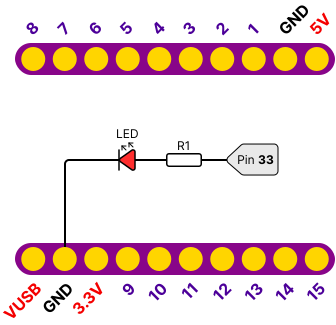
The Mainboard and every module have two connectors with ten pins each:
| Connector | Pins |
|---|---|
| Top | IO8 – IO1, GND, 5V |
| Bottom | VUSB, GND, 3.3V, IO9 – IO15 |
Pin layout of the Mainboard
- Unplug the Mainboard from USB. Always stack modules with the power off.
- Turn the module so its pin labels match the Mainboard: 5V above 5V, VUSB above VUSB. A module turned the wrong way would put power on signal pins and could get damaged.
- Push the module in straight and evenly so no pin gets bent.
- Put the next module on the previous one the same way. The signals pass through the whole tower.
- When your modules don't fit in one tower, use a Dual Base or a Triple Base. All towers on a base share the same signals, so the rules below apply to them too.
Which pins can collide
- Each pin IO1 – IO15 may be used by only one module in a build. When two modules use the same pin, they disturb each other's signal: a button and a buzzer fight over one wire, two sliders give nonsense values.
- The exception is the I2C bus on IO14 and IO15. You can connect several I2C modules to it at once, as long as each one has a different address (table below).
- Watch out for modules that use IO14 and IO15 for something other than I2C. Blink & Click has LED3 and LED4 there and the Wemos Adapter has pins D7 and D8. Such a module can't be combined with any I2C module.
- Power pins 5V, 3.3V, VUSB and GND are shared by all modules, and that is fine. The current the modules draw adds up, though.
- The built-in RGB LED on IO33 is only on the Mainboard and doesn't collide with any module.
Pin matrix
Each row is one module, each column one Mainboard pin. If two modules have something in the same column, they can't be used together. The exception is SDA SCL, the shared I2C bus. On a phone you can scroll the table sideways.
| Module | Top connector | Bottom connector | |||||||||||||
|---|---|---|---|---|---|---|---|---|---|---|---|---|---|---|---|
| 1 | 2 | 3 | 4 | 5 | 6 | 7 | 8 | 9 | 10 | 11 | 12 | 13 | 14 | 15 | |
| EDU02 Blink & Click | SW1 | SW2 | SW3 | SW4 | LED1 | LED2 | LED3 | LED4 | |||||||
| EDU03 RGB LED | R | G | B | ||||||||||||
| EDU04 7-Segment | A | B | C | D | DIO | CLK | |||||||||
| EDU05 Multisensor | BUZZ | IR_TX | IR_RX | LDR | FIRE | CONN | SDA | SCL | |||||||
| EDU06 Rotary Encoder | CLK | DT | SW | ||||||||||||
| EDU07 Sliders | SL1 | SL2 | SL3 | ||||||||||||
| EDU08 LED Matrix | DIN | ||||||||||||||
| EDU09 Relay | RELAY | ||||||||||||||
| EDU10 OLED Display | SDA | SCL | |||||||||||||
| EDU11 Potentiometer | POT | ||||||||||||||
| EDU12 Buttons | A | B | D | C | |||||||||||
| EDU13 Joystick | X | Y | SW | ||||||||||||
| EDU15 Mosfet | IN1 | ||||||||||||||
| EDU16 Compass | SDA | SCL | |||||||||||||
| EDU17 SDPlayer | TX | RX | |||||||||||||
| EDU18 Keypad | CLK | DIN | |||||||||||||
| EDU19 Servos | OUT_EN | SDA | SCL | ||||||||||||
| EDU92 Wemos Adapter | D4 | D3 | D2 | D1 | RX | TX | RST | A0 | D0 | D5 | D6 | D7 | D8 | ||
The Connect, SD Card, Gesture Sensor, Perfboard and Terminals modules aren't in the matrix yet, because their pins aren't documented yet.
I2C bus addresses
| Module | Chip | Address |
|---|---|---|
| OLED Display | 128 × 128 display | 0x3C, 0x3D with the ADDR jumper |
| Compass | compass | 0x0D |
| Servos | PCA9685 | 0x40 |
| Multisensor | connector for an external sensor | depends on the connected sensor |
All these addresses are different, so the OLED Display, Compass and Servos can all be in the tower at once. The I2C pull-up resistors are already on the Mainboard, the modules don't need them.
Collisions by pin
| Pin | Modules that use it |
|---|---|
| IO1 – IO4 | Blink & Click (buttons), 7-Segment (buttons), Multisensor (only IO1 – IO3), Buttons, Wemos Adapter |
| IO5 | RGB LED, LED Matrix, Relay, Mosfet, SDPlayer, Wemos Adapter |
| IO6 | RGB LED, SDPlayer, Wemos Adapter |
| IO7 | RGB LED, Rotary Encoder, Keypad |
| IO8 | Rotary Encoder, Keypad |
| IO9 | 7-Segment, Servos, Wemos Adapter |
| IO10 | 7-Segment, Wemos Adapter |
| IO11 | Multisensor, Sliders, Potentiometer, Joystick, Wemos Adapter |
| IO12 | Blink & Click, Multisensor, Sliders, Joystick, Wemos Adapter |
| IO13 | Blink & Click, Multisensor, Rotary Encoder, Sliders, Joystick, Wemos Adapter |
| IO14, IO15 | I2C: Multisensor, OLED Display, Compass, Servos. As ordinary pins: Blink & Click, Wemos Adapter |
Example builds
These modules work together, because each one has its own pins:
- Joystick + OLED Display + RGB LED: IO11 – IO13, I2C and IO5 – IO7. A game or a menu on the display.
- Keypad + OLED Display + Relay: IO7 and IO8, I2C and IO5. A code lock.
- Rotary Encoder + 7-Segment: IO7, IO8, IO13 and IO1 – IO4, IO9, IO10. Setting a number with a rotary knob.
- Potentiometer + Servos + Compass: IO11, IO9 and I2C. A servo driven by a knob or by the compass.
These pairs don't work together:
- Joystick + Sliders: both use IO11 – IO13.
- RGB LED + LED Matrix, Relay + Mosfet: both use IO5.
- Rotary Encoder + Keypad: both use IO7 and IO8.
- Buttons + 7-Segment: both use IO1 – IO4.
- Blink & Click + OLED Display: LED3 and LED4 sit on the I2C bus.
- Wemos Adapter + anything else: it takes every pin except IO7 and IO8, only the Keypad fits next to it.